

Create a data source
A data source is an arbitrary blob of text containing predefined static information. Our data source will contain general information about types of weather and meteorology concepts, so that our agent will be able to tell users about those things if asked.
Click "Data Sources" on the left sidebar. This will take you to a list of the existing data sources for your org. To create a new one, click "New data source" in the top-right corner.
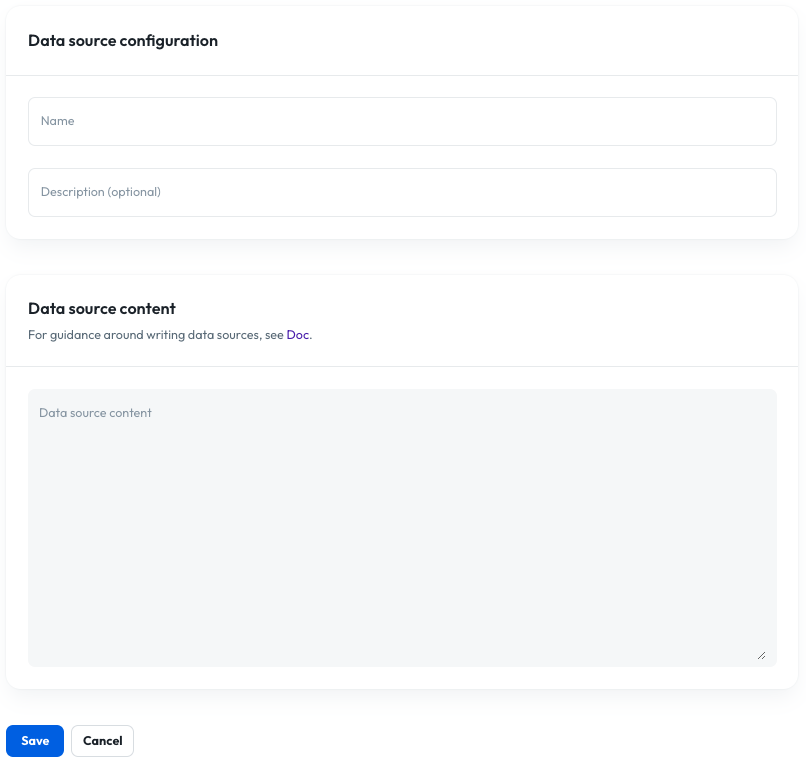
- Name: The name of the data source is used to reference it elsewhere in Console, including in tool definitions, so you should pick something that's easily identifiable. It can't contain any whitespace. Enter "weather_facts" here.
- Description (optional): This description is displayed for extra context on the data source list screen you just saw. For this data source you can enter "General information about weather" here.
- Data source content: The actual text content of the data source that the agent will be able to read. You can use the text below. (Note the sentence at the beginning - it can significantly improve search performance if you include a statement like this providing context to the LLM for what the data represents.)
The following are some general facts about weather.
1. What is Weather?
Weather refers to the atmospheric conditions at a specific place and time. It includes temperature, humidity, precipitation, wind, and visibility. Unlike climate, which describes long-term patterns, weather can change minute-to-minute.
2. Earth's Atmosphere Layers
Troposphere: Where weather occurs, extending up to 8-15 km above Earth's surface.
Stratosphere: Contains the ozone layer, which absorbs harmful UV radiation.
Mesosphere: Meteors burn up here.
Thermosphere: Northern lights occur in this layer.
Exosphere: The outermost layer blending into space.
3. Types of Weather
Sunny: Clear skies with abundant sunshine.
Rainy: Precipitation in the form of rain, occurring when moisture-laden clouds condense.
Snowy: Frozen precipitation forms snowflakes when temperatures are below freezing.
Windy: Strong winds caused by pressure differences in the atmosphere.
Cloudy: Overcast skies with various cloud formations.
Stormy: Thunderstorms, hurricanes, or tornadoes characterized by severe conditions.
4. Temperature Extremes
The highest recorded temperature on Earth was 134°F (56.7°C) in Furnace Creek Ranch, California, in 1913.
The coldest recorded temperature was -128.6°F (-89.2°C) at Vostok Station, Antarctica, in 1983.
5. Precipitation Facts
Rain forms when water vapor condenses into droplets that grow heavy enough to fall.
Snowflakes are symmetrical ice crystals, with no two snowflakes exactly alike.
Hailstones form in strong updrafts within thunderstorms, growing larger with multiple layers of ice.
6. Wind and Its Causes
Wind is the movement of air caused by differences in atmospheric pressure. High-pressure air moves toward low-pressure areas. Global wind patterns include:
Trade Winds: Near the equator.
Westerlies: Mid-latitudes.
Polar Easterlies: Near the poles.
7. Clouds and Their Types
Clouds are categorized based on their appearance and altitude:
Cumulus: Fluffy, white clouds with flat bases.
Stratus: Layered, gray clouds covering the sky.
Cirrus: Thin, wispy clouds high in the sky.
Nimbus: Rain-bearing clouds.
8. Storm Systems
Thunderstorms: Formed by cumulonimbus clouds, often accompanied by lightning, thunder, and heavy rain.
Tornadoes: Rapidly rotating columns of air in contact with the ground, with wind speeds exceeding 300 mph in extreme cases.
Hurricanes: Massive tropical cyclones with sustained winds of at least 74 mph, known as typhoons or cyclones in different regions.
9. Seasonal Weather
Seasons result from Earth’s axial tilt (23.5°):
Spring: Transition from cold to warm, characterized by blooming vegetation.
Summer: Warmest season with longer days.
Autumn: Cooler temperatures and falling leaves.
Winter: Coldest season, often bringing snow in certain regions.
10. Weather Phenomena
Rainbow: Caused by refraction, dispersion, and reflection of sunlight in water droplets.
Auroras: Natural light displays near polar regions due to solar particles colliding with Earth’s atmosphere.
Fog: A ground-level cloud formed when air cools to its dew point.
11. Weather Instruments
Thermometer: Measures temperature.
Barometer: Measures atmospheric pressure.
Hygrometer: Measures humidity.
Anemometer: Measures wind speed.
Rain Gauge: Measures precipitation.
12. Weather and Climate Change
Climate change impacts weather patterns globally:
More frequent and intense heatwaves.
Increased hurricane activity due to warmer ocean waters.
Changing precipitation patterns, causing floods and droughts.
13. Lightning and Thunder
Lightning is a sudden electrostatic discharge during a thunderstorm.
Thunder is the sound produced by the rapid expansion of air heated by lightning.
Lightning can strike the same place multiple times.
14. Droughts and Floods
Drought: Extended periods of low precipitation, affecting agriculture and water supplies.
Flood: Overflow of water onto land, caused by heavy rain, melting snow, or dam failures.
15. Hurricanes and Cyclones
Hurricanes form over warm ocean waters when sea surface temperatures exceed 26.5°C (80°F).
The strongest hurricane recorded was Hurricane Patricia (2015) with winds of 215 mph.
16. Tornado Alley
Tornado Alley in the U.S. includes states like Texas, Kansas, and Oklahoma, experiencing frequent tornadoes due to the convergence of warm, moist air from the Gulf of Mexico and cold air from the Rockies.
17. Weather Prediction
Meteorologists use models and simulations to predict weather. Techniques include:
Analyzing satellite imagery.
Doppler radar for tracking storms.
Supercomputers for running climate models.
18. Jet Streams
Jet streams are narrow bands of strong winds in the upper atmosphere, influencing weather patterns. They are faster in winter and play a crucial role in storm development.
19. El Niño and La Niña
El Niño: Warm ocean temperatures in the Pacific, causing wetter winters in some regions.
La Niña: Cooler ocean temperatures, leading to drier conditions in certain areas.
20. Global Wind Belts
Earth’s rotation and temperature differences create:
Hadley Cell: Rising air near the equator and sinking air at 30° latitude.
Ferrel Cell: Mid-latitude atmospheric circulation.
Polar Cell: Cold air descending at the poles.
21. Heatwaves
Heatwaves are prolonged periods of excessively high temperatures, often exacerbated by urban heat islands. They are among the deadliest weather events.
22. Freezing Rain and Sleet
Freezing Rain: Rain that freezes upon contact with surfaces.
Sleet: Small ice pellets formed when raindrops freeze before hitting the ground.
23. Blizzards
Blizzards are severe snowstorms with high winds exceeding 35 mph and reduced visibility below 0.25 miles for at least three hours.
24. Tsunamis and Weather
While tsunamis are caused by underwater earthquakes, their effects can influence local weather, such as coastal flooding.
25. Weather Superlatives
Wettest place: Mawsynram, India, with an average annual rainfall of 467 inches.
Driest place: Atacama Desert, Chile.
Windiest place: Commonwealth Bay, Antarctica.
26. Weather in Space
Space weather, such as solar flares and geomagnetic storms, impacts satellites, power grids, and communication systems on Earth.
27. Urban Weather
Cities create microclimates with higher temperatures due to heat absorption by buildings and roads, known as the urban heat island effect.
28. Weather Impacts on Health
Heatstroke and hypothermia are weather-related health risks.
Allergies can worsen during pollen-heavy seasons.
29. Animal Behavior and Weather
Animals often sense changes in weather:
Birds migrate ahead of storms.
Bees stay close to their hives before rain.
30. Weather Records
Heaviest rainfall in a single day: 73.62 inches in Foc-Foc, La Réunion (1966).
Largest hailstone: 8 inches in diameter in Vivian, South Dakota (2010).
31. Weather Myths
"Red sky at night, sailor’s delight": Often true, as it indicates high-pressure weather systems.
"Lightning never strikes the same place twice": False; it often does.
32. Artificial Weather Modification
Cloud seeding: Injecting substances like silver iodide into clouds to encourage rain.
Geoengineering: Proposals to combat climate change by altering atmospheric conditions.
33. Severe Weather Safety
During a tornado: Seek shelter in a basement or interior room without windows.
In lightning storms: Avoid tall objects and water.
During floods: Move to higher ground immediately.
34. Ocean and Weather Connection
Oceans store and redistribute heat, influencing coastal and global weather patterns. The Gulf Stream, for instance, moderates temperatures in Europe.
35. Weather and Agriculture
Farmers rely on weather forecasts for planting and harvesting.
Drought-resistant crops are essential in arid regions.
36. Weather Symbols
Weather maps use symbols to represent conditions:
Sun: Clear skies.
Cloud: Overcast.
Raindrops: Rain.
Snowflake: Snow.
37. Historical Weather Events
The "Year Without a Summer" (1816): Caused by the eruption of Mount Tambora.
The Dust Bowl (1930s): Severe drought in the U.S. Great Plains.
38. Weather Satellites
Satellites monitor Earth’s weather by capturing images and data on cloud movement, temperatures, and storms. Examples include GOES and Meteosat.
39. Weather and Technology
Weather apps use GPS and data from meteorological organizations.
Smart home devices can adjust settings based on real-time weather.
40. Future of Weather Forecasting
Advances in AI and machine learning are improving accuracy in forecasting, enabling better disaster preparedness and mitigation.
Click Save and wait for the data source to finish uploading. Now the general weather information is in the system, but we need to create a method for the agent to access it. We'll do this in the next step.
Click "Create tools" below to continue the tutorial.