

Data Takeout
Taking out your data from an account in Syllable is a straightforward process. It allows you to back up the data from your agents sessions in your computer. This guide will walk you through the steps to request and download your data.
You can find the Data Takeout option on the user menu in the top right corner of the Syllable console. Click on your user icon and select "Data Takeout" from the dropdown menu.
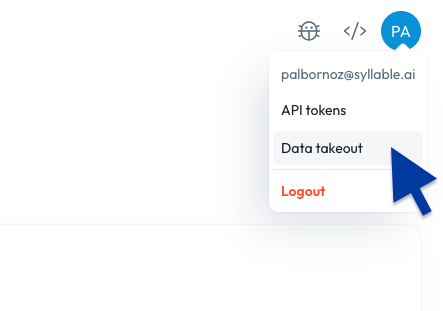
This will take you to the data takeout page. On the organization row (e.g. Trial), click on the "Request Takeout" button to initiate the process.
- Note: You can only request a takeout once every 48 hours.
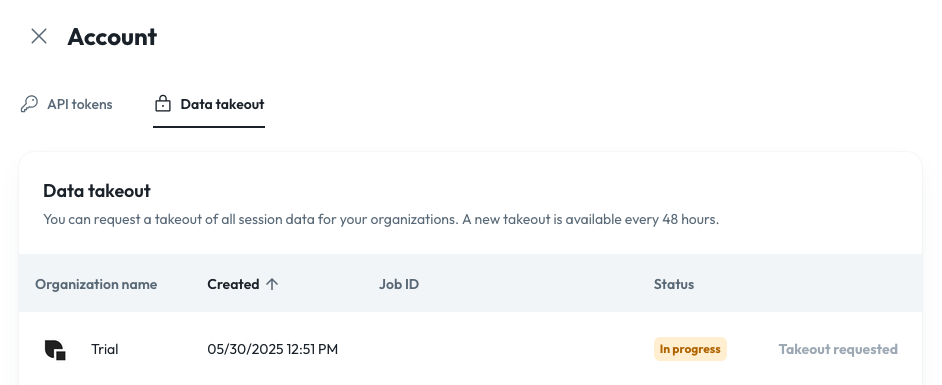
Once the request is submitted, it might take a few minutes to process. You can check the status of your request on the same page. When the data is ready, you will see a download link next to the organization.
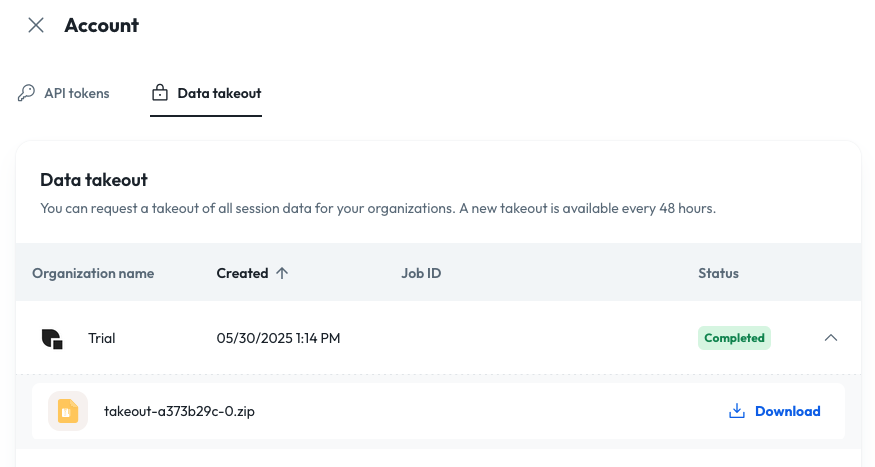
Click on the download link to download your data. The data will be in a ZIP file format, which you can extract to access your session files. Based on the number of sessions your agents have made, the data could be presented as multiple files.
What's on the ZIP file?
Each ZIP file will contain the following:
- Sessions: Each session is stored in a separate JSON file. The file name is the session ID. Sessions contain all the transcripts, tool calls and events that happened during the session.
- Manifest: The manifest is a CSV file that contains information about all the sessions in the ZIP file.