> ## Documentation Index
> Fetch the complete documentation index at: https://docs.syllable.ai/llms.txt
> Use this file to discover all available pages before exploring further.
# Campaigns
> How to set up and manage outbound campaigns using the Syllable Console interface.
A campaign is a planned and organized effort to reach out to a list of contacts over a period of time, with specified operating hours and rate of outreach (e.g., 1 call per hour).
To learn more, check out our [Campaign Tutorial Video](https://www.youtube.com/watch?v=764c-r8qNn8) and [blog post](https://syllable.ai/blog/Build-an-AI-Test-Drive-Agent/) .
## Creating a campaign
To create a campaign, navigate to "Campaigns" in the sidenav, and click "Create campaign" in the top right.
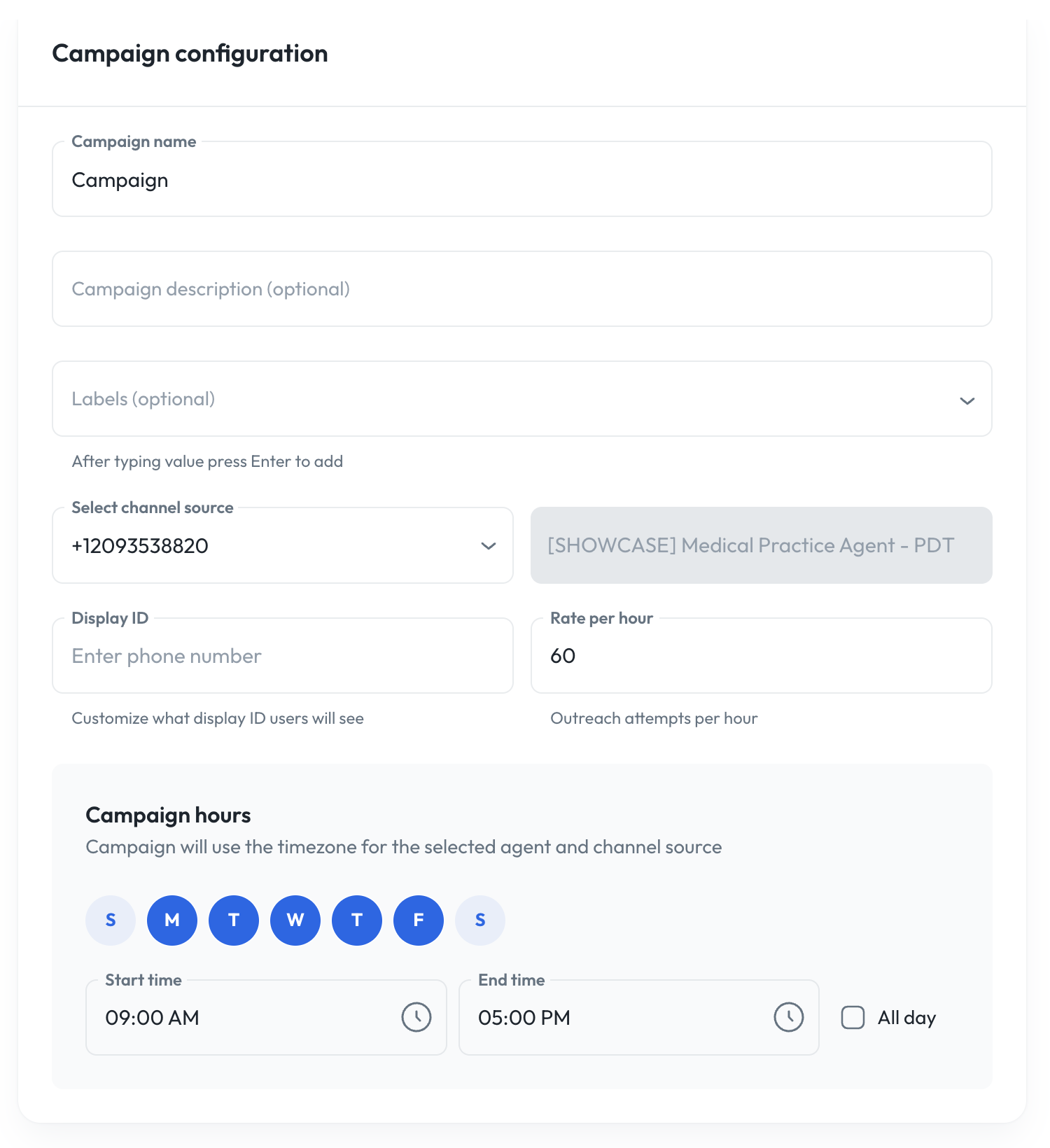 * **Name**: Name of your campaign
* **Description** (optional): Description of your campaign.
* **Labels** (optional): Add labels or tags.
* **Mode:** Select mode from Voice, SMS, Email.
* **Channel source**: Select a channel source, which is assigned to an outbound agent, that will be doing the outreach
* **Display ID**: Enter the phone number or caller ID that your recipients will see
* **Rate per hour**: Set the rate of outreach per hour (e.g., If set to 60, it will try to do 1 outreach per minute)
* **Campaign hours**: Set the days and hours of operation for your campaign. You can set it so that it will only run during weekdays, or normal business hours of 9 to 5.
### Call filtering
Voice and SMS campaigns can be restricted to reach only certain phone numbers based on what a carrier lookup reveals about each number—for example, dialing landlines and internet-based numbers but never mobile phones, or including a specific carrier that would otherwise be excluded. This is useful when an outreach effort only makes sense for a particular kind of destination, or when you need to stay within calling guidelines that depend on the type of line.
The **Call filtering** controls appear in the Campaign create and edit form (below the voicemail detection settings). You build the filter from one or more **rules**, and choose how those rules combine. When a filter is active, Syllable looks up each number as it is added to a batch and only contacts numbers the rules allow. Numbers that don't match are never dialed or messaged: they land with a request status of **SKIPPED** and a channel status of **FILTERED\_LINE\_TYPE** in the batch results. You can subscribe to `FILTERED_LINE_TYPE` as a [webhook trigger](#webhooks) if you want to be notified when numbers are filtered out.
The attributes you filter on come from Twilio's [Line Type Intelligence](https://www.twilio.com/docs/lookup/v2-api/line-type-intelligence) lookup.
To configure the filter:
1. Set **A number is dialable when it matches** to choose how rules combine:
* **all rules**: a number must match every rule to be dialed (AND).
* **any rule**: a number is dialed if it matches at least one rule (OR).
2. Set **Numbers we couldn't look up** to decide what happens to numbers whose lookup returns no data—**Dial them** or **Skip them**.
3. Click **Add rule** and configure each rule with three parts:
* **Attribute**: the number property to test:
* **Line type**: Mobile, Landline, VoIP (fixed), or VoIP (non-fixed).
* **Carrier name**: The carrier's name (for example, a specific mobile or VoIP provider).
* **Mobile country code (MCC)** and **Mobile network code (MNC)**: Numeric codes that together identify the carrier's network—a more precise, stable alternative to matching on the carrier name.
* **Condition**: how to compare—**is one of**, **is not one of**, **equals**, or **does not equal**. (For **Line type**, only **is one of** / **is not one of** are offered, since you pick line types from a list.)
* **Value**: for **Line type**, choose one or more from the dropdown; for the other attributes, type one or more values.
4. Remove a rule with the trash icon next to it. To turn filtering off entirely, remove all rules (every number is then contacted, and no lookups are performed).
As you edit, a **What this dials** summary shows in plain language exactly which numbers the current rules will dial, so you can confirm the filter does what you intend before saving.
Once a campaign is saved, its filter is shown on the campaign details view. When a batch runs, any numbers excluded by the filter appear under a **Skipped** card in the batch summary.
#### Example
To dial landlines and internet-based numbers but never mobile phones—while still allowing one specific carrier that would otherwise be classified as mobile—set **A number is dialable when it matches** to **any rule** and add two rules:
* **Line type** **is one of** Landline, VoIP (fixed), VoIP (non-fixed)
* **Carrier name** **is one of** the carrier you want to allow
When a filter is active, each number added to a batch is looked up, and these lookups are billed as a per-number usage fee, priced at Twilio's [Line Type Intelligence](https://www.twilio.com/en-us/user-authentication-identity/pricing/lookup) lookup cost. Campaigns with no rules are not charged for lookups.
## Batches
A batch is a grouping of phone numbers to call. Phone numbers to call are populated in a batch by uploading a CSV or manually adding a phone number. A campaign can have multiple batches, but a batch can only have one file upload.
### Creating a batch
To create a batch, click on a campaign, click the "Batches" tab and "Create batch" when you are viewing a campaign.
* **Name**: Name of your campaign
* **Description** (optional): Description of your campaign.
* **Labels** (optional): Add labels or tags.
* **Mode:** Select mode from Voice, SMS, Email.
* **Channel source**: Select a channel source, which is assigned to an outbound agent, that will be doing the outreach
* **Display ID**: Enter the phone number or caller ID that your recipients will see
* **Rate per hour**: Set the rate of outreach per hour (e.g., If set to 60, it will try to do 1 outreach per minute)
* **Campaign hours**: Set the days and hours of operation for your campaign. You can set it so that it will only run during weekdays, or normal business hours of 9 to 5.
### Call filtering
Voice and SMS campaigns can be restricted to reach only certain phone numbers based on what a carrier lookup reveals about each number—for example, dialing landlines and internet-based numbers but never mobile phones, or including a specific carrier that would otherwise be excluded. This is useful when an outreach effort only makes sense for a particular kind of destination, or when you need to stay within calling guidelines that depend on the type of line.
The **Call filtering** controls appear in the Campaign create and edit form (below the voicemail detection settings). You build the filter from one or more **rules**, and choose how those rules combine. When a filter is active, Syllable looks up each number as it is added to a batch and only contacts numbers the rules allow. Numbers that don't match are never dialed or messaged: they land with a request status of **SKIPPED** and a channel status of **FILTERED\_LINE\_TYPE** in the batch results. You can subscribe to `FILTERED_LINE_TYPE` as a [webhook trigger](#webhooks) if you want to be notified when numbers are filtered out.
The attributes you filter on come from Twilio's [Line Type Intelligence](https://www.twilio.com/docs/lookup/v2-api/line-type-intelligence) lookup.
To configure the filter:
1. Set **A number is dialable when it matches** to choose how rules combine:
* **all rules**: a number must match every rule to be dialed (AND).
* **any rule**: a number is dialed if it matches at least one rule (OR).
2. Set **Numbers we couldn't look up** to decide what happens to numbers whose lookup returns no data—**Dial them** or **Skip them**.
3. Click **Add rule** and configure each rule with three parts:
* **Attribute**: the number property to test:
* **Line type**: Mobile, Landline, VoIP (fixed), or VoIP (non-fixed).
* **Carrier name**: The carrier's name (for example, a specific mobile or VoIP provider).
* **Mobile country code (MCC)** and **Mobile network code (MNC)**: Numeric codes that together identify the carrier's network—a more precise, stable alternative to matching on the carrier name.
* **Condition**: how to compare—**is one of**, **is not one of**, **equals**, or **does not equal**. (For **Line type**, only **is one of** / **is not one of** are offered, since you pick line types from a list.)
* **Value**: for **Line type**, choose one or more from the dropdown; for the other attributes, type one or more values.
4. Remove a rule with the trash icon next to it. To turn filtering off entirely, remove all rules (every number is then contacted, and no lookups are performed).
As you edit, a **What this dials** summary shows in plain language exactly which numbers the current rules will dial, so you can confirm the filter does what you intend before saving.
Once a campaign is saved, its filter is shown on the campaign details view. When a batch runs, any numbers excluded by the filter appear under a **Skipped** card in the batch summary.
#### Example
To dial landlines and internet-based numbers but never mobile phones—while still allowing one specific carrier that would otherwise be classified as mobile—set **A number is dialable when it matches** to **any rule** and add two rules:
* **Line type** **is one of** Landline, VoIP (fixed), VoIP (non-fixed)
* **Carrier name** **is one of** the carrier you want to allow
When a filter is active, each number added to a batch is looked up, and these lookups are billed as a per-number usage fee, priced at Twilio's [Line Type Intelligence](https://www.twilio.com/en-us/user-authentication-identity/pricing/lookup) lookup cost. Campaigns with no rules are not charged for lookups.
## Batches
A batch is a grouping of phone numbers to call. Phone numbers to call are populated in a batch by uploading a CSV or manually adding a phone number. A campaign can have multiple batches, but a batch can only have one file upload.
### Creating a batch
To create a batch, click on a campaign, click the "Batches" tab and "Create batch" when you are viewing a campaign.
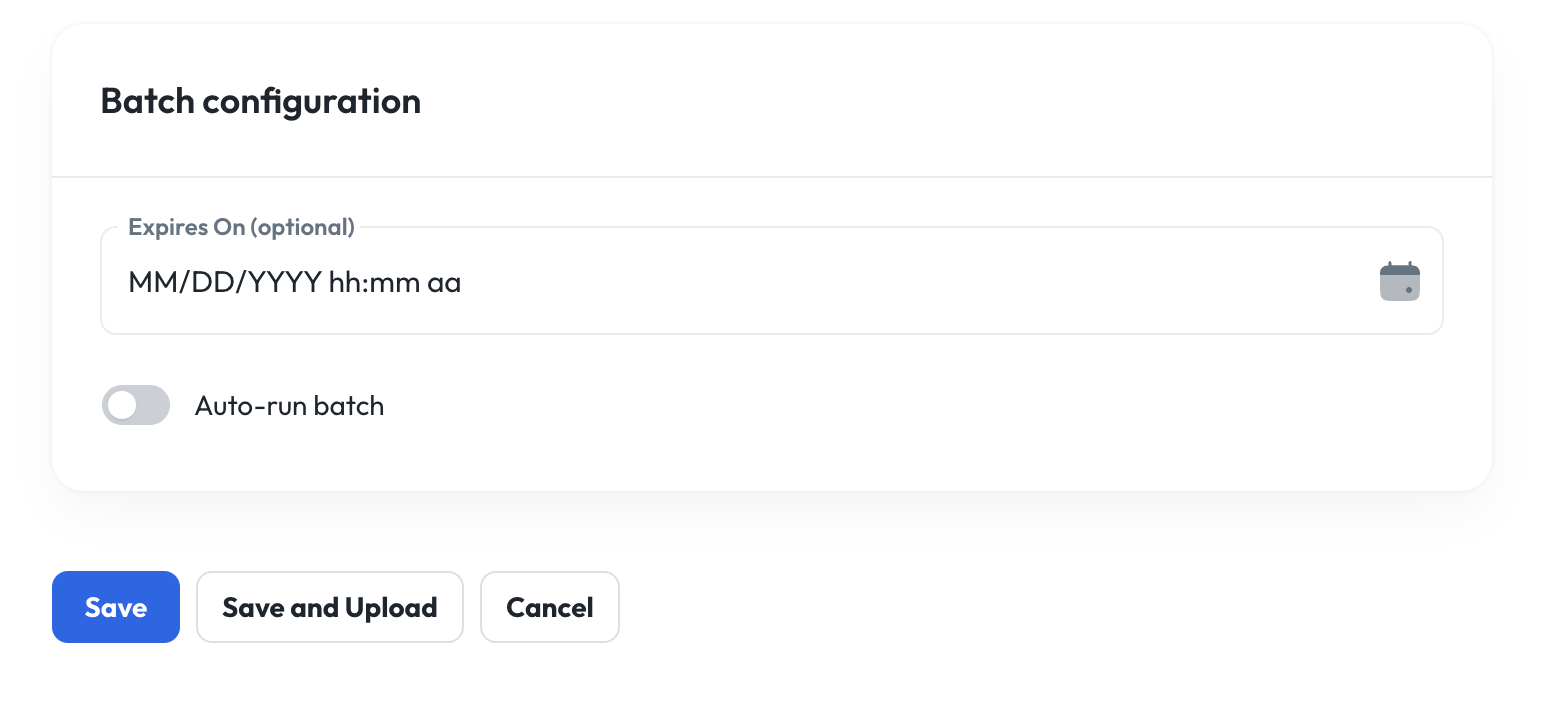 * **Expires on** (optional): Can set an expiration date for the campaign to end. This may or may not occur after all the contacts are reached out to.
* Note: Phone numbers in the batch will not be called after the expiry time
* **Auto-run batch:** This toggle is to immediately start running the campaign on the batch.
* If enabled, the campaign will automatically start reaching out to the contact list when you click "Save". And new phone numbers added to the batch will be automatically called.
* If disabled, the campaign will be paused when you click "Save", and you will need to click "Start" to have it begin reaching out.
### Uploading a batch
You can create a batch in a few ways:
* Directly through the API endpoint
* Upload a CSV file in the UI
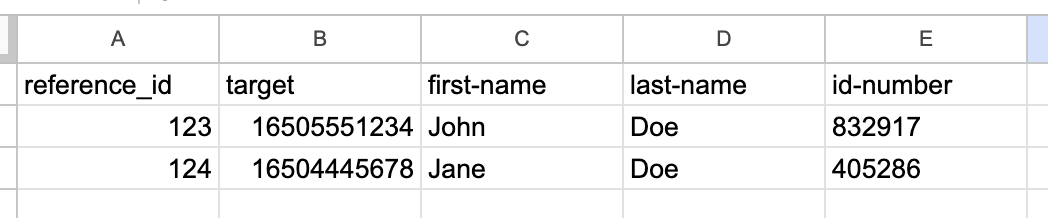
To upload a file in the UI, click "Save and Upload". Batch CSVs must contain the following columns: (Download [template](https://docs.google.com/spreadsheets/d/1Jly1QCeT8Rv_hFOoPUekIzRHxT7B80oMKZLmqeeFrME/edit?usp=sharing))
* **reference\_id**: A unique identifier
* **target**: Phone number in format +14155551234
* Any other columns can be referenced in the agent prompt or message. For example, if the CSV has a column "first-name", the agent message can be configured to say something like "Hello vars.first-name" when that phone number is called. These additional columns are also accessible by the prompt. Reference [Variables](/resources/Variables) for more details.
* **Expires on** (optional): Can set an expiration date for the campaign to end. This may or may not occur after all the contacts are reached out to.
* Note: Phone numbers in the batch will not be called after the expiry time
* **Auto-run batch:** This toggle is to immediately start running the campaign on the batch.
* If enabled, the campaign will automatically start reaching out to the contact list when you click "Save". And new phone numbers added to the batch will be automatically called.
* If disabled, the campaign will be paused when you click "Save", and you will need to click "Start" to have it begin reaching out.
### Uploading a batch
You can create a batch in a few ways:
* Directly through the API endpoint
* Upload a CSV file in the UI
To upload a file in the UI, click "Save and Upload". Batch CSVs must contain the following columns: (Download [template](https://docs.google.com/spreadsheets/d/1Jly1QCeT8Rv_hFOoPUekIzRHxT7B80oMKZLmqeeFrME/edit?usp=sharing))
* **reference\_id**: A unique identifier
* **target**: Phone number in format +14155551234
* Any other columns can be referenced in the agent prompt or message. For example, if the CSV has a column "first-name", the agent message can be configured to say something like "Hello vars.first-name" when that phone number is called. These additional columns are also accessible by the prompt. Reference [Variables](/resources/Variables) for more details.
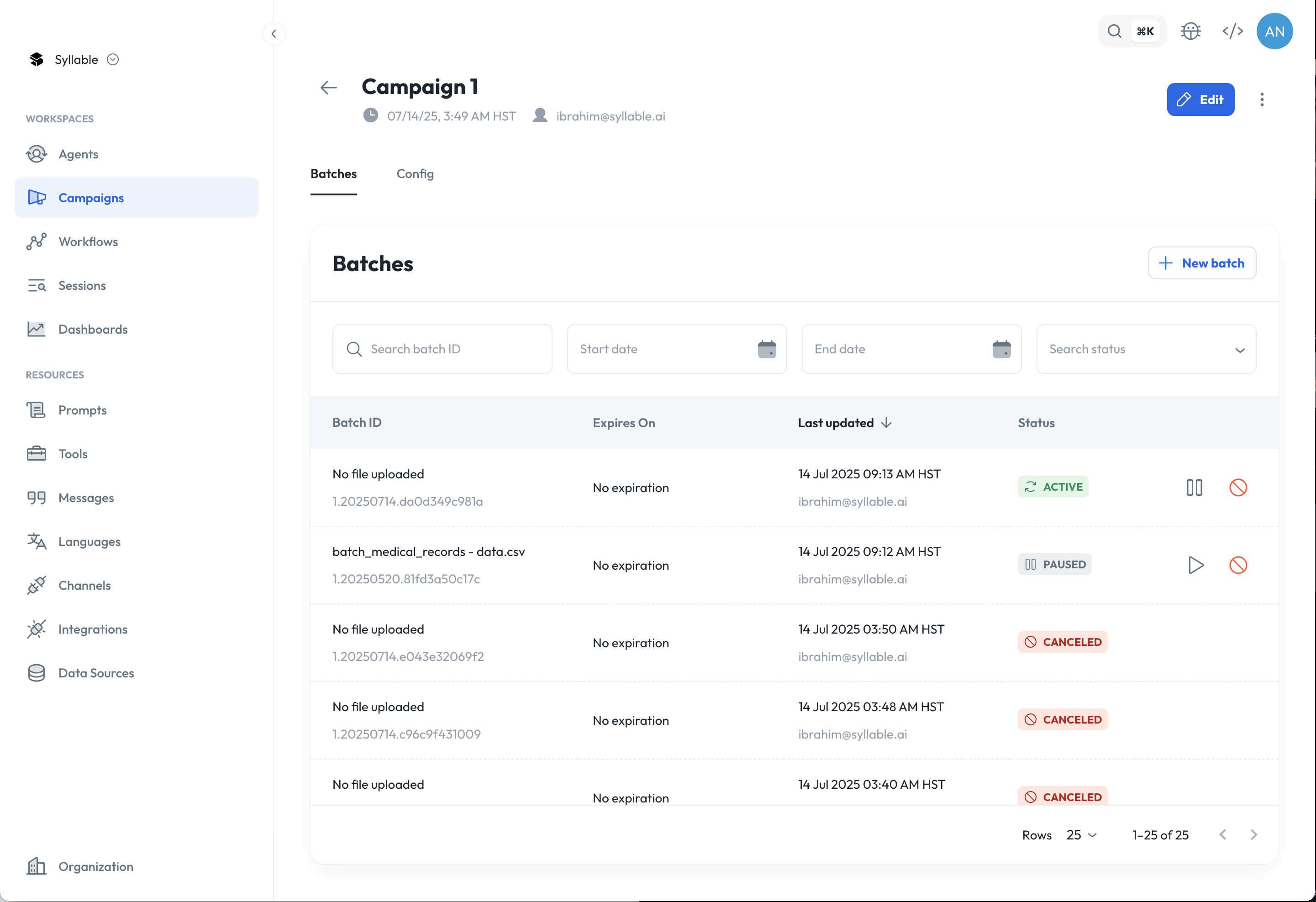 Batch statuses ([See API reference](https://docs.syllable.ai/api-reference/outboundbatches/create-outbound-communication-batch#response-status)):
* **Active**: When batch upload is successful and campaign is running (e.g., Auto-run is enabled)
* **Paused**: When batch upload is successful and campaign is paused (e.g., Auto-run is disabled)
* **Pending**: When batch is created, but there is no file uploaded yet or is being processed
* **Failed**: When batch upload is unsuccessful
* **Canceled**: When batch is canceled
* **Expired**: When batch is expired
**Tip**: While a campaign can go for weeks, it is best to have a batch run for a day.
## Testing your campaign
To test your campaign configuration and batch file upload, you can try sending one test call to see if it follows the specified business hours and rate of outreach.
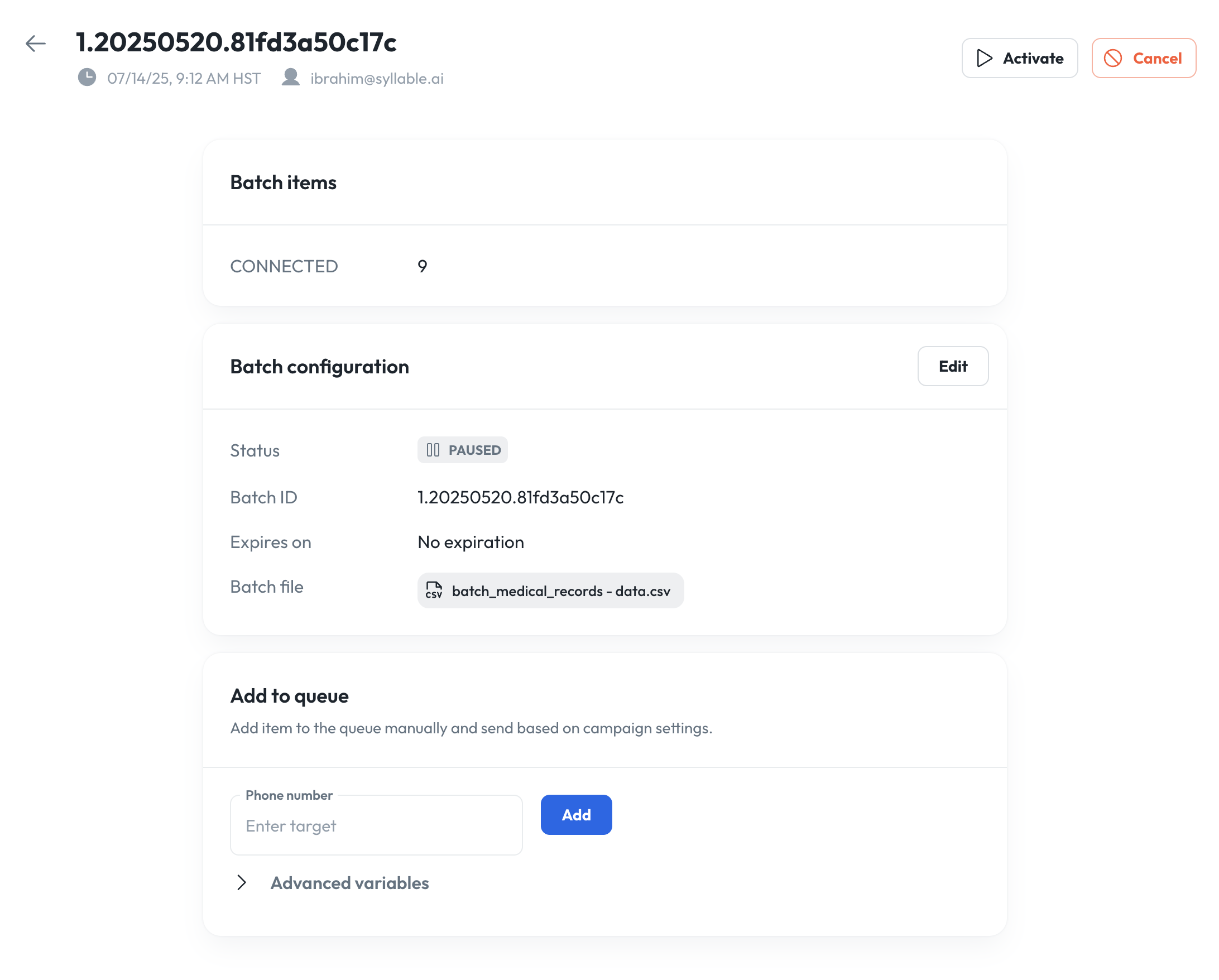
* Go to a campaign, click on Batches tab
* Click on a batch and add a test number to the "Add to queue" section
* By clicking "Add", it will be added to the batch, and will follow the campaign settings for business hours and rate of outreach.
* **Note**: Depending on your campaign settings, you may need to wait until the next scheduled outreach.
Batch statuses ([See API reference](https://docs.syllable.ai/api-reference/outboundbatches/create-outbound-communication-batch#response-status)):
* **Active**: When batch upload is successful and campaign is running (e.g., Auto-run is enabled)
* **Paused**: When batch upload is successful and campaign is paused (e.g., Auto-run is disabled)
* **Pending**: When batch is created, but there is no file uploaded yet or is being processed
* **Failed**: When batch upload is unsuccessful
* **Canceled**: When batch is canceled
* **Expired**: When batch is expired
**Tip**: While a campaign can go for weeks, it is best to have a batch run for a day.
## Testing your campaign
To test your campaign configuration and batch file upload, you can try sending one test call to see if it follows the specified business hours and rate of outreach.
* Go to a campaign, click on Batches tab
* Click on a batch and add a test number to the "Add to queue" section
* By clicking "Add", it will be added to the batch, and will follow the campaign settings for business hours and rate of outreach.
* **Note**: Depending on your campaign settings, you may need to wait until the next scheduled outreach.
 ## Campaign statuses
When running outbound campaigns, each request (voice call, SMS message, or email) moves through multiple statuses.
### Voice
| **Status** | **Meaning** |
| :------------------------------ | :--------------------------------------------------------------------------------------------------------------------------------------------------------------------------------------------------------------------------------------------------------------------------------------------------------------------------------------------------------------------------- |
| DUPLICATE | Communication was filtered out by validation as a duplicate |
| INVALID | Communication was filtered out by validation for having an invalid destination |
| FILTERED\_LINE\_TYPE | The destination was excluded by the campaign's [call filter](#call-filtering), so the number was never dialed. Available as a [webhook trigger](#webhooks). |
| PENDING | Communication has passed validation and is waiting to be sent |
| CANCELED | Communication had been PENDING but batch was canceled |
| COMPLETED | Call was successfully placed without voicemail detection enabled |
| BUSY | Twilio: "Twilio dialed the number, but received a busy response." |
| DECLINED | SIP: "The callee's machine was successfully contacted but the user explicitly does not wish to or cannot participate...This status response is returned only if the client knows that no other end point will answer the request." |
| FAILED | Twilio reported the call as failed directly—for example, the destination was unreachable or the number was entered incorrectly. |
| SIP\_NOT\_FOUND | SIP: The destination could not be found (response code 404). |
| SIP\_TEMPORARILY\_UNAVAILABLE | SIP: The destination is temporarily unavailable (response code 480). |
| SIP\_LOOP\_DETECTED | SIP: A routing loop was detected while trying to reach the destination (response code 482). |
| SIP\_DOES\_NOT\_EXIST\_ANYWHERE | SIP: The destination does not exist anywhere on the network (response code 604). |
| NO-ANSWER | Twilio: "Twilio dialed the number but no one answered before the timeout parameter value elapsed. This can be configured for each call, but by default is set to 60 seconds on [outbound API calls](https://www.twilio.com/docs/voice/api/call#parameters), and 30 seconds on [outbound \ calls](https://www.twilio.com/docs/voice/twiml/dial#timeout)." |
| MACHINE | Call was successfully placed with voicemail detection enabled - voicemail detection determined that the call reached a voicemail |
| HUMAN | Call was successfully placed with voicemail detection enabled - voicemail detection determined that the call reached a human |
| UNKNOWN | Call was successfully placed with voicemail detection enabled - voicemail detection was not able to determine whether the call reached a voicemail or a human |
| UNEXPECTED\_ERROR | Any other call failure that isn't covered by one of the statuses above. |
```mermaid placement="bottom-right" theme={null}
flowchart TD
START([Outbound voice call])
START --> V{Validation}
V -->|Duplicate request in same batch| DUPLICATE[DUPLICATE
## Campaign statuses
When running outbound campaigns, each request (voice call, SMS message, or email) moves through multiple statuses.
### Voice
| **Status** | **Meaning** |
| :------------------------------ | :--------------------------------------------------------------------------------------------------------------------------------------------------------------------------------------------------------------------------------------------------------------------------------------------------------------------------------------------------------------------------- |
| DUPLICATE | Communication was filtered out by validation as a duplicate |
| INVALID | Communication was filtered out by validation for having an invalid destination |
| FILTERED\_LINE\_TYPE | The destination was excluded by the campaign's [call filter](#call-filtering), so the number was never dialed. Available as a [webhook trigger](#webhooks). |
| PENDING | Communication has passed validation and is waiting to be sent |
| CANCELED | Communication had been PENDING but batch was canceled |
| COMPLETED | Call was successfully placed without voicemail detection enabled |
| BUSY | Twilio: "Twilio dialed the number, but received a busy response." |
| DECLINED | SIP: "The callee's machine was successfully contacted but the user explicitly does not wish to or cannot participate...This status response is returned only if the client knows that no other end point will answer the request." |
| FAILED | Twilio reported the call as failed directly—for example, the destination was unreachable or the number was entered incorrectly. |
| SIP\_NOT\_FOUND | SIP: The destination could not be found (response code 404). |
| SIP\_TEMPORARILY\_UNAVAILABLE | SIP: The destination is temporarily unavailable (response code 480). |
| SIP\_LOOP\_DETECTED | SIP: A routing loop was detected while trying to reach the destination (response code 482). |
| SIP\_DOES\_NOT\_EXIST\_ANYWHERE | SIP: The destination does not exist anywhere on the network (response code 604). |
| NO-ANSWER | Twilio: "Twilio dialed the number but no one answered before the timeout parameter value elapsed. This can be configured for each call, but by default is set to 60 seconds on [outbound API calls](https://www.twilio.com/docs/voice/api/call#parameters), and 30 seconds on [outbound \ calls](https://www.twilio.com/docs/voice/twiml/dial#timeout)." |
| MACHINE | Call was successfully placed with voicemail detection enabled - voicemail detection determined that the call reached a voicemail |
| HUMAN | Call was successfully placed with voicemail detection enabled - voicemail detection determined that the call reached a human |
| UNKNOWN | Call was successfully placed with voicemail detection enabled - voicemail detection was not able to determine whether the call reached a voicemail or a human |
| UNEXPECTED\_ERROR | Any other call failure that isn't covered by one of the statuses above. |
```mermaid placement="bottom-right" theme={null}
flowchart TD
START([Outbound voice call])
START --> V{Validation}
V -->|Duplicate request in same batch| DUPLICATE[DUPLICATE
Filtered as duplicate]
V -->|Invalid destination| INVALID[INVALID
Invalid destination]
V -->|No validation issues| PENDING[PENDING
Queued to send]
PENDING -->|Batch canceled| CANCELED[CANCELED
Was PENDING, batch canceled]
PENDING -->|Twilio places call| TW{Call outcome}
TW -->|Busy signal| BUSY[BUSY]
TW -->|Callee declined or carrier blocked as e.g. spam (SIP)| DECLINED[DECLINED]
TW -->|Twilio reports failure directly| FAILED[FAILED]
TW -->|Carriers could not connect (SIP)| SIPERR{SIP response code}
TW -->|Timeout, no answer| NOANS[NO-ANSWER]
SIPERR -->|404| SIPNF[SIP_NOT_FOUND]
SIPERR -->|480| SIPTU[SIP_TEMPORARILY_UNAVAILABLE]
SIPERR -->|482| SIPLD[SIP_LOOP_DETECTED]
SIPERR -->|604| SIPDNE[SIP_DOES_NOT_EXIST_ANYWHERE]
SIPERR -->|Other| UNEXPECTED[UNEXPECTED_ERROR]
TW -->|Connected| VMD{Voicemail detection enabled?}
VMD -->|No| COMPLETED[COMPLETED
Call placed, no VMD]
VMD -->|Yes| VMH{Voicemail detection result}
VMH -->|Voicemail| MACHINE[MACHINE]
VMH -->|Human| HUMAN[HUMAN]
VMH -->|Could not classify| UNKNOWN[UNKNOWN]
style DUPLICATE fill:#f9f,stroke:#333
style INVALID fill:#f9f,stroke:#333
style CANCELED fill:#ffe,stroke:#333
```
### SMS
| **Status** | **Meaning** |
| :------------------- | :----------------------------------------------------------------------------------------------------------------------------------------------------------------------------------------------------------------------------------------------------------------------------------------------------------------------------------------------------------------------------------------------------------------------------------------------------------------------------------------------------------------------------------------------------------------------------------------------------------------------------------------------------------------------------------------------------------------------------------------------------------------------------------------------------------------------------------------------------------------------------------- |
| DUPLICATE | Communication was filtered out by validation as a duplicate |
| INVALID | Communication was filtered out by validation for having an invalid destination |
| FILTERED\_LINE\_TYPE | The destination was excluded by the campaign's [call filter](#call-filtering), so the message was never sent. Available as a [webhook trigger](#webhooks). |
| PRIOR\_UNSUBSCRIBED | Communication was filtered out by validation because a previous communication to the same user has status UNSUBSCRIBED |
| PENDING | Communication has passed validation and is waiting to be sent |
| CANCELED | Communication had been PENDING but batch was canceled |
| SENT | Twilio: "Twilio has received a confirmation from our Super Network partner advising they have accepted the message. Twilio has not received updated delivery information for your message. Typically, a sent status will be replaced by a delivered or undelivered status within seconds or minutes. Please note that US/Canada long code MMS often remain in sent status due to a lack of final delivery status updates from carriers. Once a message is older than 72 hours, receiving a further status is unlikely, although we will update the record if we receive one. Your messages will stay in sent status forever if you are sending messages using the deprecated [/SMS/Message REST API Resource](https://help.twilio.com/articles/223181028-Switching-from-SMS-Messages-resource-URI-to-Messages-resource-URI), which does not support delivery status updates." |
| ACCEPTED | Twilio: "(Messaging Services only) Twilio has received your request to create the message from a Messaging Service. Twilio is determining the optimal 'From' number from your service." |
| QUEUED | Twilio: "Twilio has received your request to create the message. All new messages sent from a specific Twilio phone number are created with a status of queued." |
| SENDING | Twilio: "Twilio is in the process of sending the message. This status is usually only present for a very short time, and in most instances will not be visible in the console or logs." |
| UNDELIVERED | Twilio: "Twilio has received a delivery receipt indicating that the message was not delivered. This can happen for a number of reasons including carrier content filtering, availability of the destination handset, etc." |
| DELIVERY\_FAILED | Twilio "failed" status: "The message could not be sent. This can happen for various reasons including queue overflows, account suspensions and media errors (in the case of MMS)." |
| DELIVERY\_UNKNOWN | Twilio: "(Displayed in Messaging Insights) This indicates that a message has remained in the sent status for longer than 1 hour without receiving a further status update. This status is only shown in Messaging Insights; SMS records will remain in the sent status in the Message Log or /Messages API." |
| DELIVERED | Twilio SMS: "Twilio has received confirmation of message delivery from the carrier, (and, where available, the destination handset)." |
| UNSUBSCRIBED | During the conversation, the user opted out |
```mermaid theme={null}
flowchart TD
START([Outbound SMS message])
START --> V{Validation}
V -->|Duplicate request in same batch| DUPLICATE[DUPLICATE]
V -->|Invalid destination| INVALID[INVALID]
V -->|Recipient previously opted out| PRIOR_UNSUB[PRIOR_UNSUBSCRIBED]
V -->|No validation issues| PENDING[PENDING
Queued to send]
PENDING -->|Batch canceled| CANCELED[CANCELED]
PENDING -->|Submitted to Twilio| PIPE{Twilio pipeline}
PIPE -->|Send failure| DELFAIL[DELIVERY_FAILED]
PIPE -->|Messaging Service| ACCEPTED[ACCEPTED]
PIPE -->|Direct number| QUEUED[QUEUED]
ACCEPTED --> QUEUED
QUEUED --> SENDING[SENDING]
SENDING --> SENT[SENT
Accepted by carrier network]
SENT -->|Carrier receipt| DELIVERED[DELIVERED]
SENT -->|Not delivered| UNDELIV[UNDELIVERED]
SENT -->|No update 1h+| DELUNK[DELIVERY_UNKNOWN
Twilio Messaging Insights only]
SENT --> CONV{During conversation?}
CONV -->|User opts out| UNSUB[UNSUBSCRIBED]
style DUPLICATE fill:#f9f,stroke:#333
style INVALID fill:#f9f,stroke:#333
style PRIOR_UNSUB fill:#f9f,stroke:#333
style CANCELED fill:#ffe,stroke:#333
```
### Email
| **Status** | **Meaning** |
| :------------------ | :------------------------------------------------------------------------------------------------------------------------------------------------------------------------------------------------------------------------------------------------------------------------------------------------------------------------------------------- |
| DUPLICATE | Communication was filtered out by validation as a duplicate |
| INVALID | Communication was filtered out by validation for having an invalid destination |
| PRIOR\_UNSUBSCRIBED | Communication was filtered out by validation because a previous communication to the same user has status UNSUBSCRIBED |
| PRIOR\_SPAM\_REPORT | Communication was filtered out by validation because a previous email to the same user has status SPAM\_REPORT |
| PRIOR\_DROPPED | Communication was filtered out by validation because a previous email to the same user has status DROPPED |
| PRIOR\_BOUNCED | Communication was filtered out by validation because a previous email to the same user has status BOUNCED |
| PENDING | Communication has passed validation and is waiting to be sent |
| CANCELED | Communication had been PENDING but batch was canceled |
| PROCESSED | Email has been accepted by SendGrid and will be sent |
| DROPPED | SendGrid: "There are a number of reasons your email will not even be sent to a recipient for delivery. This event informs your system when an email has been dropped. Further, it provides a reason for the drop, such as if we've found spam content (if spam checker app is enabled) or we see the recipient has unsubscribed previously." |
| DEFERRED | SendGrid: "When an email cannot immediately be delivered, but it hasn't been completely rejected, the deferred event fires. Sometimes called a soft bounce, SendGrid will continue to try for 72 hours to deliver a deferred message. After 72 hours, the deferral turns into a block." |
| BOUNCED | SendGrid: "If a server cannot or will not deliver a message, SendGrid fires a bounce event. Bounces often are caused by outdated or incorrectly entered email addresses. Many times you won't know a bounced email address until it bounces, so this event can help you ensure it doesn't bounce again by removing it from your lists." |
| DELIVERED | SendGrid: Email has been accepted by the receiving server (we don't know for a fact that it's in the user's inbox at this point, but can get more info if it moves to OPENED, CLICKED, SPAM\_REPORT, or UNSUBSCRIBED) |
| OPENED | SendGrid: "This event fires every time your email is viewed with images turned on" |
| CLICKED | Recipient clicked a link in the email body |
| SPAM\_REPORT | During the conversation, the user reported the email they received as spam |
| UNSUBSCRIBED | During the conversation, the user unsubscribed |
```mermaid theme={null}
flowchart TD
START([Outbound email])
START --> V{Validation}
V -->|Duplicate request in same batch| DUPLICATE[DUPLICATE]
V -->|Invalid destination| INVALID[INVALID]
V -->|Recipient previously unsubscribed| PRIOR_UNSUB[PRIOR_UNSUBSCRIBED]
V -->|Recipient previously reported spam| PRIOR_SPAM[PRIOR_SPAM_REPORT]
V -->|Previous email was DROPPED| PRIOR_DROP[PRIOR_DROPPED]
V -->|Previous email BOUNCED| PRIOR_BOUNCE[PRIOR_BOUNCED
Prior BOUNCED]
V -->|No validation issues| PENDING[PENDING
Queued to send]
PENDING -->|Batch canceled| CANCELED[CANCELED]
PENDING -->|Accepted by SendGrid| PROCESSED[PROCESSED
Will be sent]
PROCESSED --> SG{SendGrid lifecycle}
SG -->|Never sent| DROPPED[DROPPED]
SG -->|Soft bounce, retry up to 72h| DEFERRED[DEFERRED]
SG -->|Hard failure| BOUNCED[BOUNCED]
DEFERRED -->|Eventually| BOUNCED
DEFERRED -->|Success| DELIVERED[DELIVERED
Accepted by receiving server]
PROCESSED -->|If not dropped/deferred/bounced first| DELIVERED
DELIVERED --> ENG{Recipient engagement}
ENG --> OPENED[OPENED]
ENG -->|Clicks a link in email| CLICKED[CLICKED]
ENG -->|Reports spam| SPAM[SPAM_REPORT]
ENG -->|Unsubscribes| UNSUB[UNSUBSCRIBED]
OPENED --> CLICKED
OPENED --> SPAM
OPENED --> UNSUB
style DUPLICATE fill:#f9f,stroke:#333
style INVALID fill:#f9f,stroke:#333
style PRIOR_UNSUB fill:#f9f,stroke:#333
style PRIOR_SPAM fill:#f9f,stroke:#333
style PRIOR_DROP fill:#f9f,stroke:#333
style PRIOR_BOUNCE fill:#f9f,stroke:#333
style CANCELED fill:#ffe,stroke:#333
```
## Voicemail detection
Voicemail detection lets an outbound campaign tell whether a call was answered by a live person or a voicemail system, so the agent can respond appropriately — leaving a message on voicemail, or starting a live conversation with a person.
In the Campaign create and edit form, the **Voicemail detection** setting is a dropdown with three options:
* **Disabled** — no voicemail detection. The agent opens every call the same way, based on its prompt.
* **Voicemail Detection v1** — the standard detection described below.
* **Voicemail Detection v2 (beta)** — an improved detection flow for trickier answering scenarios. See [Voicemail Detection v2 (beta)](#voicemail-detection-v2-beta).
Only one mode can be active at a time.
### Voicemail Detection v1
When a call connects, Syllable determines whether the answer is from a live person or a voicemail system. If a voicemail is detected, the agent leaves a pre-recorded message for the recipient. If no voicemail is detected, the agent or workflow proceeds with a live interaction, based on the agent's instructions.
**Configuration options**
With Voicemail Detection v1 selected, you can configure detection timeouts to control when and how voicemail is identified:
* **Pre-speech timeout:** Time allowed before the callee begins speaking. If the user does not speak within this timeout, the conversation proceeds normally.
* **Post-speech timeout:** Time allowed after the callee finishes speaking. If the user stays silent for this duration, the system considers the speech ended and makes a decision.
* **Overall timeout:** Maximum total duration for voicemail detection to run before returning a result.
These values can be adjusted per campaign or per workspace to balance speed and accuracy.
**Prompt**
When voicemail detection is enabled, the agent is by default instructed to leave a voicemail\_message explaining why the agent called and asking the user to call back. You can override this behavior by adding information to your prompt, for example:
> If you reach a voicemail set the voicemail\_message to: "Hello, this is New Bay Health calling to assist you with scheduling your recent referral. We're eager to assist you at your earliest convenience. Please give us a call back at 555-123-1234. Our scheduling team is available Monday through Friday from 7:00 AM to 5:00 PM to assist you. Thank you."
### Voicemail Detection v2 (beta)
Voicemail Detection v2 is in beta. It is available for outbound voice campaigns and is mutually exclusive with Voicemail Detection v1 — selecting v2 turns v1 off.
Voicemail Detection v2 improves how the agent handles the start of an outbound call, especially when it's unclear who — or what — picked up. Instead of playing its greeting the moment the call connects, the agent stays quiet, listens to how the call is answered, and figures out whether it reached a live person, a voicemail system, or an automated call screener. It then responds accordingly:
* **A live person** — the agent delivers your configured greeting and continues the conversation.
* **A voicemail system** — the agent leaves your voicemail message and ends the call.
* **An automated call screener** (for example, a system that asks for your name and reason for calling) — the agent answers the screener's questions and works through the call the same way a person would: it can **respond to keypad (touch-tone) menus** by pressing the requested digits, and it can **wait on hold** when asked to hold. Once a human comes on the line, it greets the person and continues the conversation.
This handles real-world answering behavior more naturally than always speaking first, which reduces cases where the agent talks over a greeting or misjudges who answered.
**Requirements**
* A **greeting** must be configured on the campaign's agent. Because the agent waits to identify a live person before speaking, it needs a greeting to deliver at that point. If the agent has no greeting configured, the campaign cannot be saved with Voicemail Detection v2 and you'll see an error on save.
* Voicemail Detection v2 does not use the v1 detection timeouts, so those fields are hidden when v2 is selected.
**How to enable it**
1. Open your campaign in the **Campaigns** workspace and click **Edit** (or create a new campaign).
2. In the **Voicemail detection** dropdown, select **Voicemail Detection v2 (beta)**.
3. Make sure the campaign's agent has a greeting configured.
4. Click **Save**.
## Webhooks
Webhooks give your systems real-time visibility into call progress. When an outbound call session changes status - for example, when a call connects, fails, or completes - Syllable sends an HTTP request to your registered webhook URL with details about the event. This allows you to programmatically track call outcomes, trigger alerting on failures, and update internal records without polling or waiting for a campaign to finish.
Webhooks are configured at the **campaign level**. You can route different statuses to different endpoints - for example, send `FAILED` events to an alerting service and `COMPLETED` events to a logging system.
### Configuring webhooks
Webhooks can be configured through the Console campaign configuration screen, the [API](/api-reference/outboundcampaigns/create-outbound-communication-campaign), or the SDK.
Each webhook requires:
| Parameter | Type | Description |
| :----------------- | :---------------- | :----------------------------------------------------------------------------- |
| `url` | String | The HTTPS URL to receive webhook payloads. |
| `trigger_statuses` | Array of strings | The call statuses that trigger this webhook (e.g., `["COMPLETED", "FAILED"]`). |
| `request_method` | String | HTTP method for the request. Must be `POST`, `PUT`, or `PATCH`. |
| `auth_values` | Object (optional) | Authentication configuration. See [Authentication](#webhook-authentication). |
1. Navigate to your outbound campaign in the Console.
2. In the campaign configuration, find the **Webhooks** section.
3. Click **Add webhook**.
4. Enter your HTTPS URL (e.g., `https://your-server.com/hooks/syllable`).
5. Select the trigger statuses you want to receive (e.g., `COMPLETED`, `FAILED`).
6. Choose your authentication method and provide the required credentials.
7. Save the campaign.
```python theme={null}
from syllable_sdk import SyllableSDK, models
import os
with SyllableSDK(
api_key_header=os.getenv("SYLLABLESDK_API_KEY_HEADER", ""),
) as client:
res = client.outbound.campaigns.create(request={
"campaign_name": "Appointment Reminders",
"campaign_variables": {"key": "value"},
"caller_id": "19995551234",
"active_days": [
models.DaysOfWeek.MON,
models.DaysOfWeek.TUE,
models.DaysOfWeek.WED,
models.DaysOfWeek.THU,
models.DaysOfWeek.FRI,
],
"webhooks": [
{
"trigger_statuses": [
models.ChannelManagerStatus.COMPLETED,
models.ChannelManagerStatus.FAILED,
],
"url": "https://your-server.com/hooks/syllable",
"request_method": "POST",
"auth_values": {
"hmac_secret": "your-base64-encoded-secret",
},
},
],
})
```
```typescript theme={null}
import { SyllableSDK } from "syllable-sdk";
const client = new SyllableSDK({
apiKeyHeader: process.env["SYLLABLESDK_API_KEY_HEADER"] ?? "",
});
const result = await client.outbound.campaigns.create({
campaignName: "Appointment Reminders",
campaignVariables: { key: "value" },
callerId: "19995551234",
activeDays: ["mon", "tue", "wed", "thu", "fri"],
webhooks: [
{
triggerStatuses: ["COMPLETED", "FAILED"],
url: "https://your-server.com/hooks/syllable",
requestMethod: "POST",
authValues: {
hmac_secret: "your-base64-encoded-secret",
},
},
],
});
```
```bash theme={null}
curl -X POST https://api.syllable.cloud/api/v1/outbound/campaigns \
-H "Content-Type: application/json" \
-H "Syllable-API-Key: $SYLLABLE_API_KEY" \
-d '{
"campaign_name": "Appointment Reminders",
"campaign_variables": {"key": "value"},
"caller_id": "19995551234",
"active_days": ["mon", "tue", "wed", "thu", "fri"],
"webhooks": [
{
"trigger_statuses": ["COMPLETED", "FAILED"],
"url": "https://your-server.com/hooks/syllable",
"request_method": "POST",
"auth_values": {
"hmac_secret": "your-base64-encoded-secret"
}
}
]
}'
```
### Webhook payload
When an outbound communication transitions to a status that matches one of your configured triggers, Syllable sends an `HTTP POST` request with `Content-Type: application/json`.
```json theme={null}
{
"data": {
"campaign_id": 17,
"batch_id": "91.20260512.asdf1234",
"recipient": "+14155550100",
"source": "outbound_campaign",
"batch_upload_filename": "outreach_batch_jan2026.csv",
"session_id": 98765,
"channel_manager_status": "FAILED",
"error_message": "The destination number is not a valid phone number"
},
"event_time": "2026-06-05T18:45:23.456789+00:00"
}
```
| Field | Type | Description |
| :----------------------- | :---------------- | :----------------------------------------------------------------------------------------------------------------------------------------------------------- |
| `event_time` | String (ISO 8601) | UTC timestamp of when the status change occurred. |
| `campaign_id` | Number | The ID of the campaign this communication belongs to. Use this to correlate events back to a specific campaign when your webhook handles multiple campaigns. |
| `batch_id` | String | Unique identifier of the batch that included this communication. |
| `recipient` | String | The destination phone number or address of the outbound communication. |
| `source` | String \| null | The source identifier of the campaign. `null` if not set. |
| `batch_upload_filename` | String \| null | The filename of the batch upload that included this communication. Use this to tie the event back to your original source file. `null` if not applicable. |
| `session_id` | Number | Unique identifier for the outbound call session. Stable across retries—use this for correlation and deduplication. |
| `channel_manager_status` | String | The communication's new status. See [Campaign statuses](#campaign-statuses) for the full list. |
| `error_message` | String \| null | Description of the error if the communication failed. `null` when no error occurred. |
### Webhook authentication
Webhook requests are authenticated using an HMAC signature to ensure they originate from Syllable.
**HMAC signature**
When you configure HMAC authentication, you provide a Base64-encoded shared secret (RFC 4648, decoding to 32–512 bytes of key material). Each webhook request will include two headers:
| Header | Description |
| :--------------------- | :---------------------------------------------------------------------------------- |
| `X-Syllable-Timestamp` | Unix timestamp of when the webhook was sent. |
| `X-Syllable-Signature` | HMAC-SHA256 signature of `{timestamp}.{raw_body}`, computed with the shared secret. |
To verify a request:
1. Extract the `X-Syllable-Timestamp` and `X-Syllable-Signature` headers.
2. Concatenate the timestamp, a literal `.`, and the raw request body: `{timestamp}.{raw_body}`.
3. Compute the HMAC-SHA256 of that string using your shared secret.
4. Compare your computed signature to `X-Syllable-Signature` using a **constant-time comparison** to prevent timing attacks.
5. Reject requests where the timestamp is older than 5 minutes to mitigate replay attacks.
```python Python (Flask) theme={null}
import hmac
import hashlib
import base64
import time
from flask import Flask, request, abort
app = Flask(__name__)
WEBHOOK_SECRET_B64 = "your-base64-encoded-secret"
@app.route("/hooks/syllable", methods=["POST"])
def handle_webhook():
timestamp = request.headers.get("X-Syllable-Timestamp", "")
signature = request.headers.get("X-Syllable-Signature", "")
if abs(time.time() - int(timestamp)) > 300:
abort(401, "Stale timestamp")
secret = base64.b64decode(WEBHOOK_SECRET_B64)
message = f"{timestamp}.".encode() + request.get_data()
expected = hmac.new(secret, message, hashlib.sha256).hexdigest()
if not hmac.compare_digest(expected, signature):
abort(401, "Invalid signature")
event = request.get_json()
print(f"Session {event['session_id']}: {event['channel_manager_status']}")
return "OK", 200
if __name__ == "__main__":
app.run(port=8000)
```
```typescript TypeScript (Express) theme={null}
import express from "express";
import crypto from "crypto";
const app = express();
const WEBHOOK_SECRET_B64 = "your-base64-encoded-secret";
app.post(
"/hooks/syllable",
express.raw({ type: "application/json" }),
(req, res) => {
const timestamp = req.headers["x-syllable-timestamp"] as string;
const signature = req.headers["x-syllable-signature"] as string;
if (Math.abs(Date.now() / 1000 - parseInt(timestamp)) > 300) {
return res.status(401).send("Stale timestamp");
}
const secret = Buffer.from(WEBHOOK_SECRET_B64, "base64");
const message = Buffer.concat([
Buffer.from(`${timestamp}.`),
req.body,
]);
const expected = crypto
.createHmac("sha256", secret)
.update(message)
.digest("hex");
if (
!crypto.timingSafeEqual(
Buffer.from(expected),
Buffer.from(signature)
)
) {
return res.status(401).send("Invalid signature");
}
const event = JSON.parse(req.body.toString());
console.log(
`Session ${event.session_id}: ${event.channel_manager_status}`
);
res.sendStatus(200);
}
);
app.listen(8000, () => console.log("Listening on :8000"));
```
### Delivery and retries
Your webhook endpoint must respond with a `2xx` HTTP status code **within 10 seconds** to acknowledge receipt. The timeout covers the full HTTP response cycle. We recommend accepting the payload and processing it asynchronously if your handling logic may take longer.
If your endpoint returns a non-`2xx` status code or does not respond within the timeout, Syllable retries delivery:
* Up to **2 retry attempts** (i.e., 3 total attempts) over approximately **15 minutes**.
* If all attempts fail, the delivery is marked as failed.
**Webhook delivery order is not guaranteed.** Use the `event_time` timestamp to determine the correct sequence of events. Because retries may cause duplicate deliveries, your endpoint should treat webhooks as **at-least-once delivery**. Use `data.campaign_id` + `data.batch_id` + `data.recipient` + `data.channel_manager_status` + `event_time` together as a deduplication key.
If you don't receive events, check:
* Your endpoint is publicly reachable over HTTPS.
* The trigger statuses on the webhook match the call outcomes you're testing.
* Your endpoint returns `200` within 10 seconds.
* Failed deliveries are visible in the Console under the campaign's webhook status.
## Monitoring your campaign
Keep track of your campaign's progress by viewing the batch status or overall campaign status. You can also see the outbound campaign calls, summaries, and transcripts in Sessions.
For more detailed steps, check out our [Campaign Tutorial Video](https://www.youtube.com/watch?v=764c-r8qNn8) and [blog post](https://syllable.ai/blog/Build-an-AI-Test-Drive-Agent/) .